

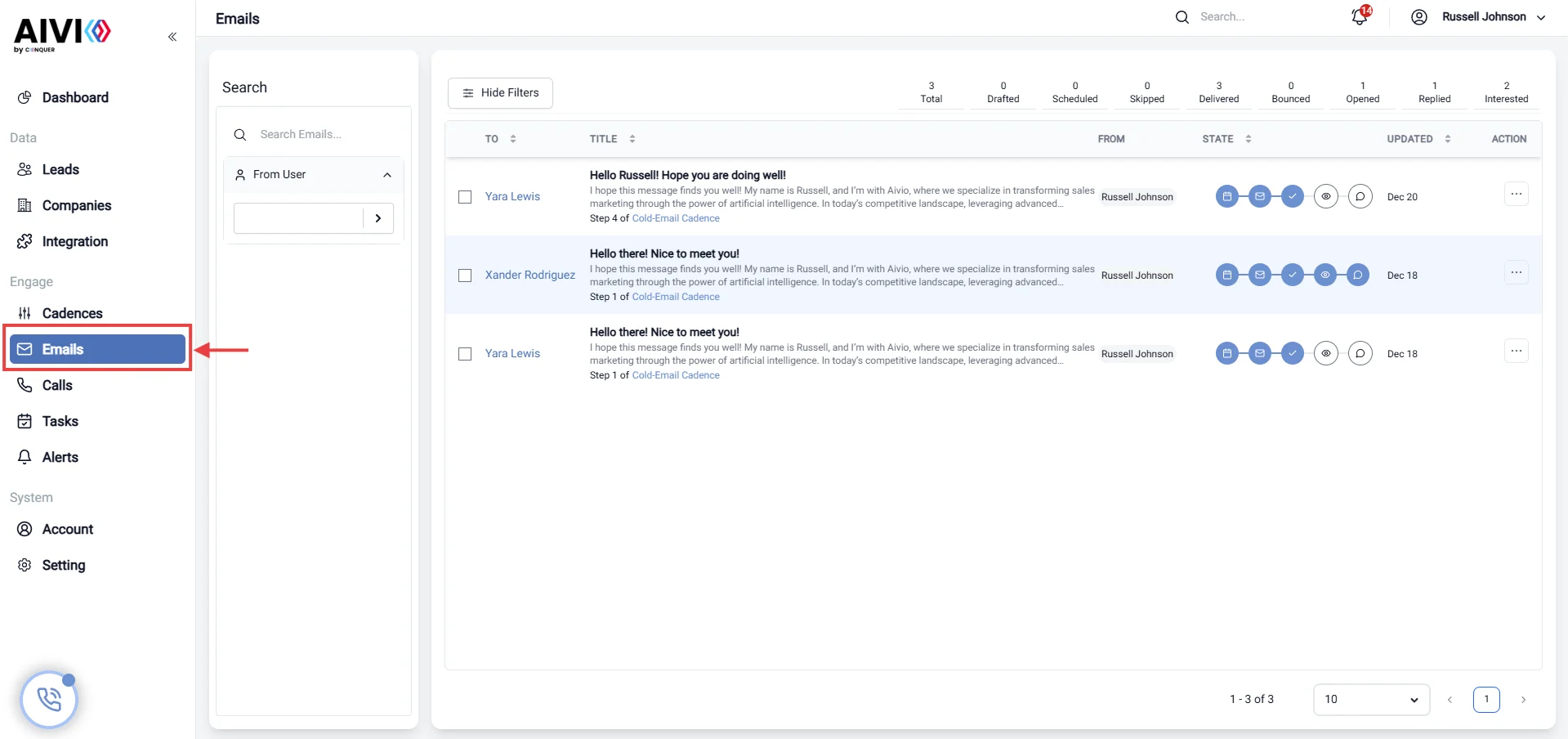
Email Page Overview
The Email Page serves as a comprehensive dashboard for reviewing and analyzing email communications. This page provides insights into email engagement, history, and the overall effectiveness of your marketing campaigns.Key Features
1. Email State Review
- Current Status: View the current status of your emails, including whether they are sent, delivered, opened, or bounced.
- Status Indicators: Use visual indicators to quickly assess the health of your email campaigns.
2. Email History
- Sent Emails Log: Access a chronological log of all sent emails, including timestamps and recipients.
- Response Tracking: Monitor replies and follow-ups to gauge recipient engagement.
- Email Templates: Store and access commonly used email templates for quick reference.
3. Email Engagement Analysis
- Open Rates: Analyze the percentage of recipients who opened your emails. This metric helps gauge the effectiveness of your subject lines and sending times.
- Click-Through Rates (CTR): Measure how many recipients clicked on links within your emails, providing insight into content relevance and engagement.
- Bounce Rates: Track the percentage of emails that could not be delivered, helping to identify issues with your email list.
4. Marketing Campaign Performance
- Campaign Overview: Review the performance of individual marketing campaigns, including metrics such as total sends, opens, clicks, and conversions.
- A/B Testing Results: Analyze results from A/B tests to determine which email versions perform better and optimize future campaigns accordingly.
- Segmentation Analysis: Evaluate how different audience segments respond to your emails, allowing for tailored marketing strategies.
5. Engagement Metrics
- Unsubscribe Rates: Monitor the number of recipients who opt out of your email list, providing insights into content relevance and audience satisfaction.
- Forwarding and Sharing: Track how often your emails are forwarded or shared, indicating content that resonates with your audience.
6. Integration with CRM
- Contact Management: Seamlessly integrate with your CRM system to manage contacts and track interactions.
- Personalization: Utilize CRM data to personalize email content for better engagement.
7. Reporting and Insights
- Customizable Reports: Generate reports on various metrics to assess campaign performance over time.
- Visual Dashboards: Utilize graphs and charts to visualize data for easier analysis and decision-making.
8. Actionable Insights
- Recommendations: Receive automated suggestions for improving email performance based on historical data and engagement trends.
- Follow-Up Reminders: Set reminders for follow-up emails to ensure timely communication with recipients.