

Overview
Lead tracking is a fundamental component of effective sales and marketing strategies. In the Cadence framework, you can monitor the status and engagement levels of your leads, enabling you to make informed decisions and optimize your outreach efforts.1. Lead Status Tracking
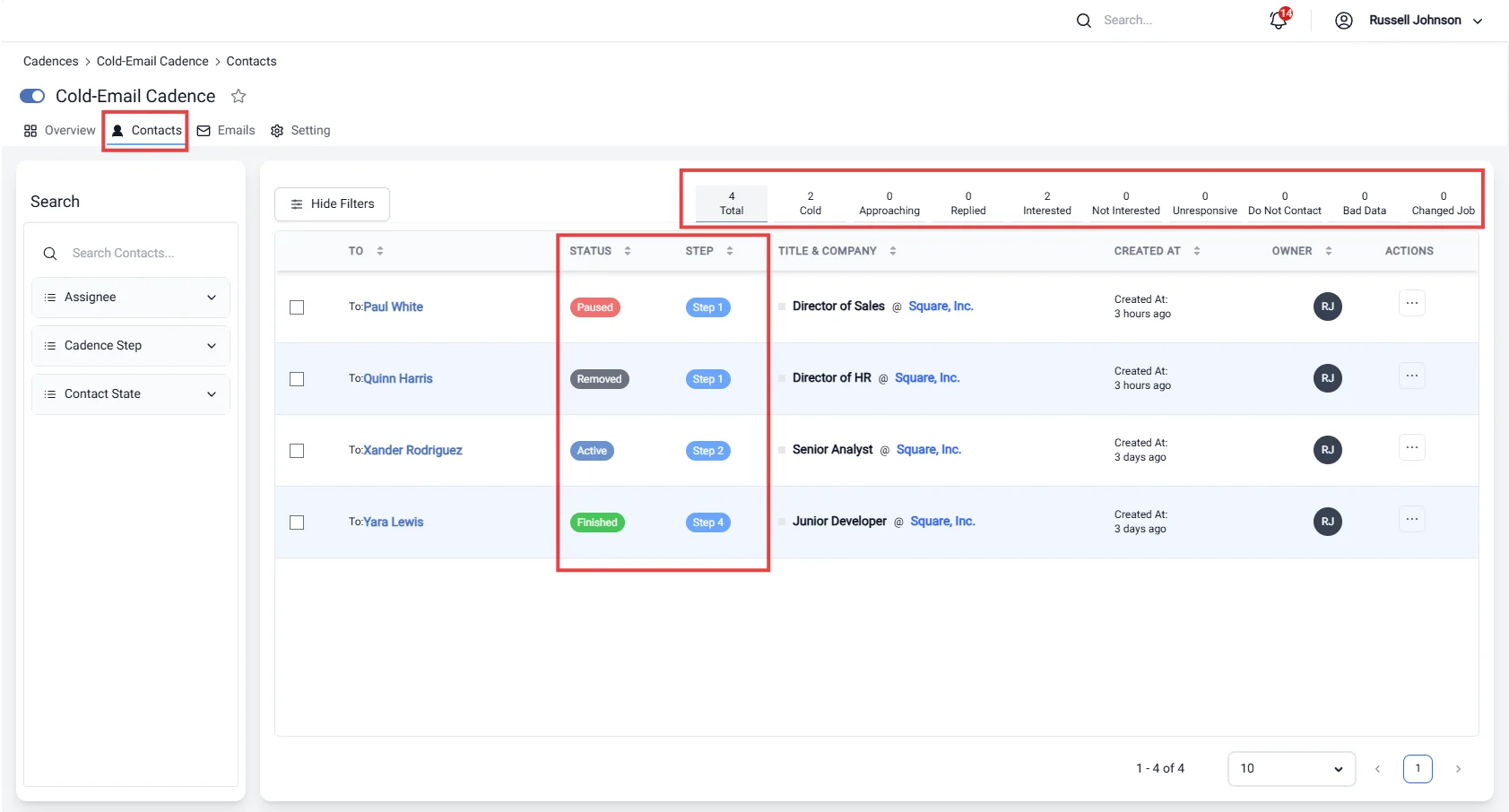
In the table of leads within Cadence, you can easily track the status of each lead. This feature provides a clear overview of where each lead stands in the engagement process, allowing you to:- Monitor Progress: Keep an eye on how leads move through different stages of the cadence, from initial contact to final follow-up.
- Identify Bottlenecks: Quickly identify leads that may require additional attention or follow-ups due to inactivity or lack of response.
- Organize Outreach: Based on the lead status, you can prioritize your outreach efforts, ensuring that you focus on leads that are most likely to convert.
2. Lead Analytics in Cadence
Analyzing lead data is crucial for understanding the effectiveness of your engagement strategies. The analytics dashboard provides insights into various lead statuses, including:- Total: The total number of leads currently in the cadence, giving you a comprehensive view of your outreach efforts.
- Cold: Leads that have not engaged with your communications for a significant period. Identifying cold leads allows you to strategize re-engagement efforts.
- Approaching: Leads that are nearing a follow-up deadline. This status helps you prioritize timely actions to avoid losing potential opportunities.
- Replied: Leads that have responded to your outreach. Tracking replies helps gauge interest and effectiveness of your messaging.
- Interested: Leads that have shown a clear interest in your offerings. These leads should be prioritized for personalized follow-ups.
- Not Interested: Leads that have explicitly indicated they are not interested. This status helps in refining your target audience and reducing unnecessary follow-ups.
- Unresponsive: Leads that have not engaged despite multiple outreach attempts. Understanding this status can help you adjust your approach or remove them from active campaigns.
- Do Not Contact: Leads that should be excluded from future outreach for various reasons, such as previous requests to opt out.
- Bad Data: Leads with inaccurate or incomplete information. Maintaining a clean database is essential for effective communication.
- Changed Job: Leads that have updated their employment status. Keeping track of these changes ensures that your outreach remains relevant and targeted.
Importance of Lead Tracking
Effective lead tracking in Cadence allows you to:- Enhance Engagement: By understanding lead status and analytics, you can tailor your communication strategies to improve engagement rates.
- Refine Strategies: Analyzing lead data helps identify what works and what doesn’t, allowing you to continuously improve your outreach efforts.
- Maximize Conversions: With clear visibility into lead statuses, you can prioritize high-potential leads and increase your chances of conversion.